Workshop outcome
This chapter is intended to move beyond product awareness. It should help you plan the work, select the correct hardware class, execute or supervise the change, test the result and produce useful handover evidence.
DEEP TECHNICALFIELD WORKFLOWACCEPTANCE1. Two PSUs are only the starting point
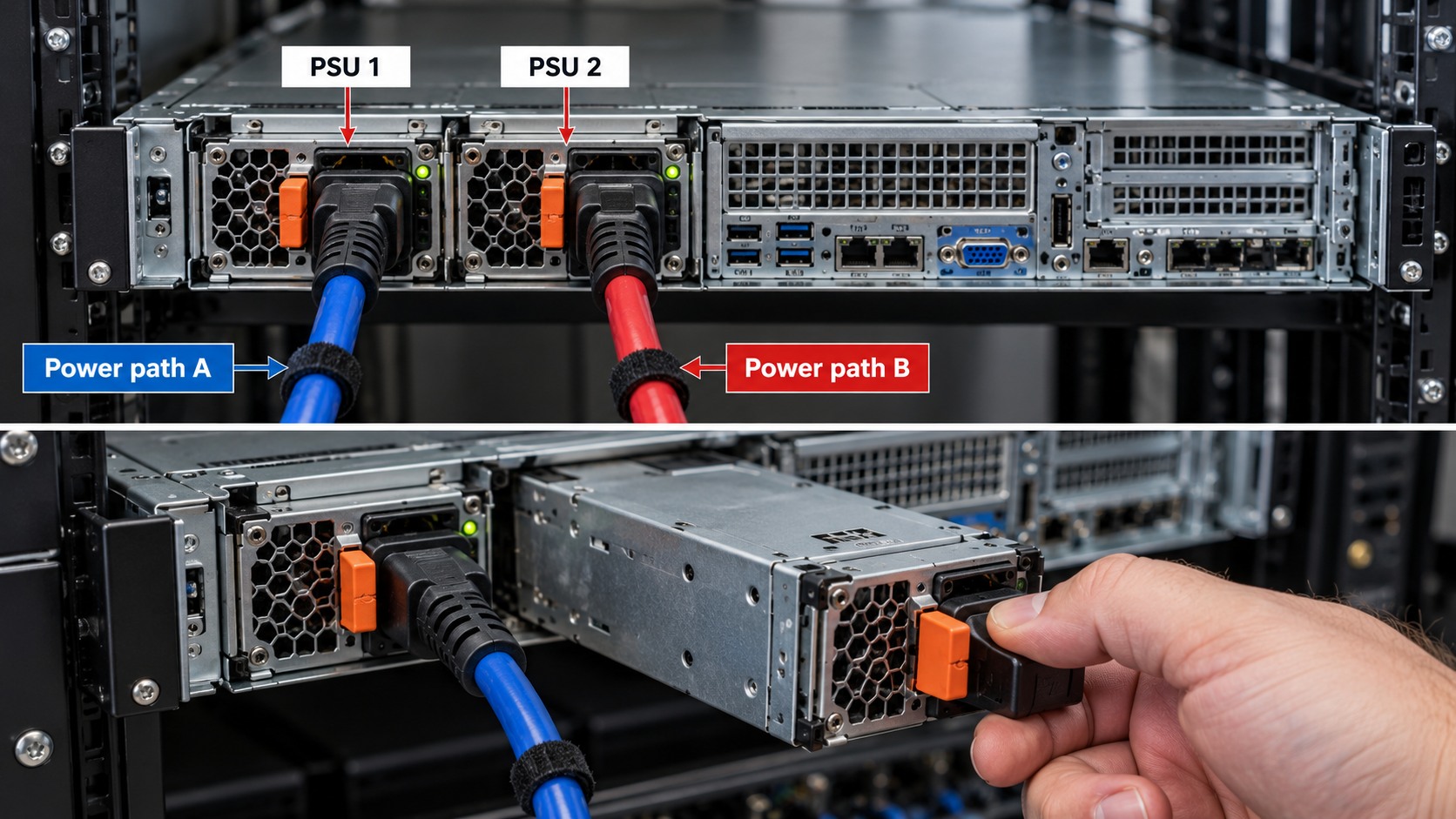
A server with two PSUs can still have a single upstream failure if both cords feed one PDU, one UPS or one circuit. Redundancy must be traced end to end.
2. Verify PSU redundancy state
Use the management controller to confirm both PSUs are present, healthy and operating in the intended redundancy policy. Check that the remaining PSU can support the load if one path is lost.
3. Define A and B paths
Label the intended A and B feeds. Ideally each path remains independent through rack PDU and upstream protection according to the site design. Do not create a false A/B label on two sockets from the same source.
4. Check connector and electrical compatibility
Confirm input voltage, connector type, cord rating, PDU outlet type and PSU input range. PSU wattage alone does not prove server compatibility.
5. Cable for serviceability
Route A and B cords so that a technician can identify and isolate one path without disturbing the other. Avoid tight tension at hot-plug PSU handles.
6. Test one failure at a time
Where the site change procedure permits, prove redundancy by removing or isolating one feed at a time while monitoring server health. Never create an uncontrolled live test on a critical production system.
7. Observe load transfer
Watch PSU status, power draw, alarms and application health. A design that remains powered but overloads the surviving path is not adequate redundancy.
8. Document the power chain
Record PSU bay to cord to PDU outlet to PDU identifier to UPS/circuit source. This makes later maintenance far safer.
9. Acceptance
Both PSU paths are healthy, independently identifiable, surviving capacity is adequate, alarms are clear and the rack power map matches the physical installation.
Worked field scenario
A server has two healthy 800 W PSUs but both cords disappear into the same rack PDU. The server has PSU redundancy but not feed redundancy. A proper A/B exercise maps each PSU to a different intended PDU/source and proves the surviving path can carry the load.
Do not proceed from a product label alone. Convert the requirement into measurable compatibility, capacity, installation and acceptance checks.
Procurement questions before ordering
The ordering stage is where many field problems are created. Capture the following before selecting the exact product:
- Exact server model and generation
- Current CPU and memory/storage/controller inventory
- Manufacturer support matrix or service manual
- Firmware and management-controller level
- Maintenance window and rollback hardware
Where a manufacturer compatibility list, rail matrix, supported-optics table or battery cartridge reference exists, record the exact source used for the decision. That gives the later installer evidence rather than a verbal assumption.
Fault-finding decision path
Start with the management controller and hardware event logs. Correlate the logical fault with the physical slot or bay before touching hardware. Check whether the symptom follows a component, a slot, a cable/backplane path or a firmware state. Make one controlled change at a time and preserve the original configuration until the replacement is proven.
Keep a simple change log while troubleshooting: observation, action, result. If a change does not alter the symptom, put the system back unless there is a documented reason to retain it. This prevents troubleshooting from becoming an uncontrolled configuration drift.
Common mistakes that create repeat faults
Do not rely on physical fit, wattage, capacity or connector shape as proof of compatibility. Do not clear useful logs before saving them. Do not replace multiple components simultaneously unless the recovery procedure specifically requires it, because that destroys the evidence needed to identify the actual cause.
A technically successful installation can still be a poor operational result if the next technician cannot identify what was installed, why it was selected, or how it was tested. Serviceability is part of infrastructure quality.
Acceptance and handover evidence
Capture before and after inventory, firmware levels, hardware health, event logs and the exact parts installed or removed. For a production server, acceptance also includes operating-system visibility and a representative application or workload check, not only a green front-panel LED.
Use filenames, labels and port/bay identifiers that match the physical installation. Handover evidence should let someone who was not present at the installation verify the final state and repeat the important tests later.
RELATED HARDWARE
Apply the lesson to Server Warehouse
These are educational category relationships. Always verify exact model compatibility, firmware, electrical limits, supported media and manufacturer requirements before ordering.
Technical references
Manufacturer documentation and the project specification remain authoritative for model-specific limits, procedures and safety requirements.