Workshop outcome
This chapter is intended to move beyond product awareness. It should help you plan the work, select the correct hardware class, execute or supervise the change, test the result and produce useful handover evidence.
DEEP TECHNICALFIELD WORKFLOWACCEPTANCE1. Know the equipment airflow direction
Most rack servers are designed for front-to-rear airflow, but verify each device. Network equipment can have different airflow options.
2. Separate intake and exhaust paths
Arrange the rack and room so equipment draws appropriate supply air and exhaust is not immediately returned to the front.
3. Close unused rack openings
Blanking panels help reduce recirculation through unused U spaces. Also address large side gaps or floor/cable openings according to the cabinet/site design.
4. Do not block equipment intakes
Cable bundles, shelves, loose packaging and poorly placed PDUs can obstruct fans or exhaust paths.
5. Cable for airflow and service
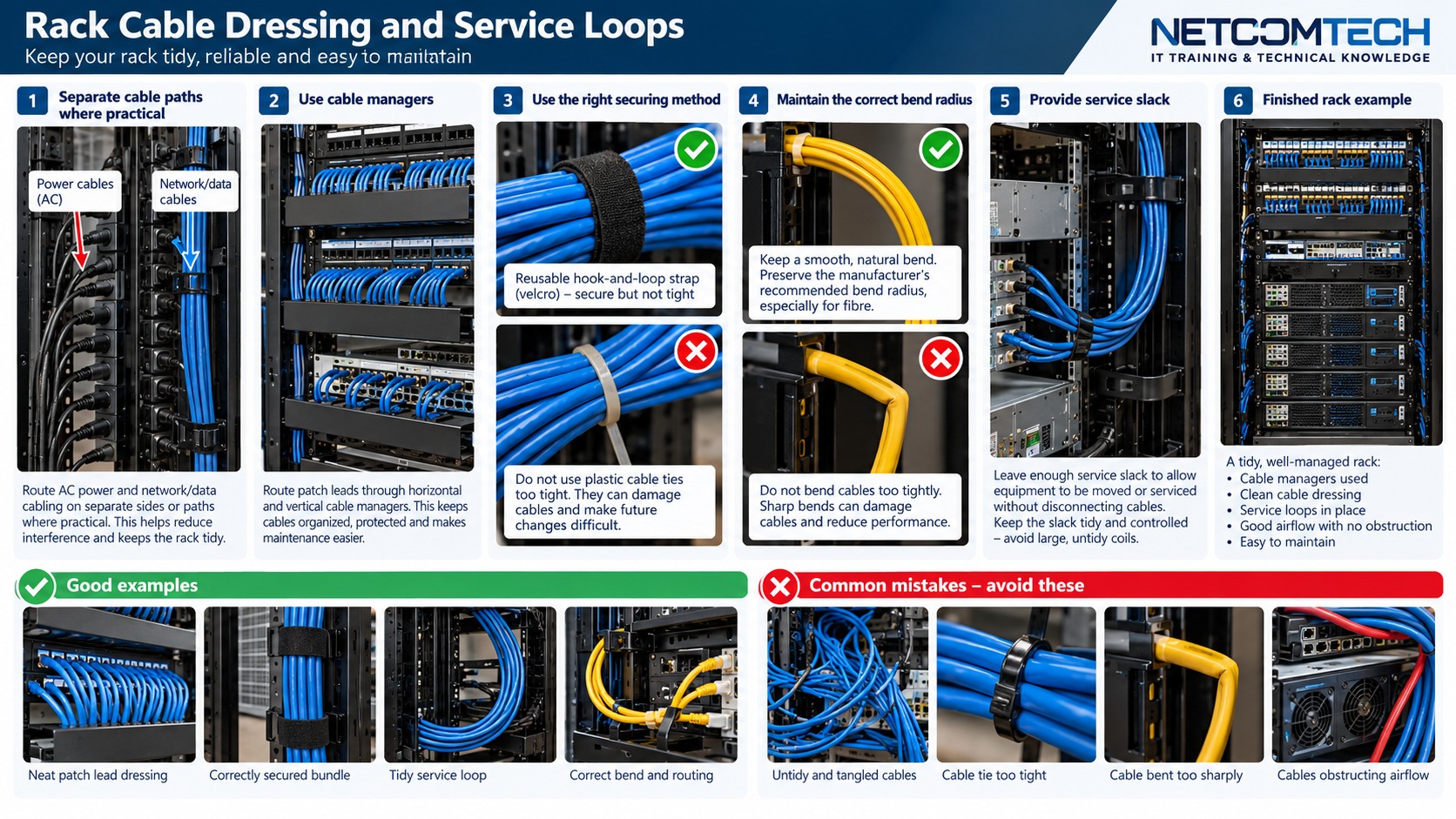
Dress rear cabling along planned vertical/horizontal paths. Keep service loops controlled rather than creating dense coils behind hot equipment.
6. Observe temperatures, not only room setpoint
Use server inlet sensors, management data and targeted measurements. A cool room can still have one rack ingesting hot recirculated air.
7. Load changes alter the thermal picture
Commissioning at idle is not the same as production. Observe the rack under representative load where practical.
8. Respond to hot spots systematically
Check blanking, cable obstruction, failed fans, door/filter restriction, supply-air delivery and recirculation before simply lowering room temperature.
9. Handover
Record rack layout, blanking positions, airflow direction exceptions, baseline inlet temperatures and any thermal alarms/thresholds.
Worked field scenario
The room is cool but one top-of-rack server reports high inlet temperature. Check for exhaust recirculation through empty U spaces, cable obstruction and supply-air delivery before lowering the room thermostat. The server inlet sensor is closer to the real problem than the wall thermostat.
Do not proceed from a product label alone. Convert the requirement into measurable compatibility, capacity, installation and acceptance checks.
Procurement questions before ordering
The ordering stage is where many field problems are created. Capture the following before selecting the exact product:
- Equipment U height, depth and mass
- Rail-kit mounting-depth range
- Front/rear cable and service clearance
- PDU position and power connectors
- Airflow direction and cabinet load limit
Where a manufacturer compatibility list, rail matrix, supported-optics table or battery cartridge reference exists, record the exact source used for the decision. That gives the later installer evidence rather than a verbal assumption.
Fault-finding decision path
For physical rack problems, trace the constraint rather than forcing the equipment. Determine whether the issue is rail spacing, square/round-hole hardware, rear clearance, PDU collision, cable bend, weight support or door interference. For thermal faults, follow airflow from intake to exhaust and look for recirculation or obstruction.
Keep a simple change log while troubleshooting: observation, action, result. If a change does not alter the symptom, put the system back unless there is a documented reason to retain it. This prevents troubleshooting from becoming an uncontrolled configuration drift.
Common mistakes that create repeat faults
Do not choose a cabinet from U height alone. Do not support heavy servers on one improvised shelf edge or mismatched rails. Do not leave deep coils of cable in exhaust paths, and do not call two PDUs A and B unless the upstream paths are genuinely defined.
A technically successful installation can still be a poor operational result if the next technician cannot identify what was installed, why it was selected, or how it was tested. Serviceability is part of infrastructure quality.
Acceptance and handover evidence
Keep a rack elevation, equipment/rail inventory, PDU outlet map, cable-path notes and photographs of front/rear finished state. For server racks, include depth measurements and any equipment that has unusual airflow or service-clearance requirements.
Use filenames, labels and port/bay identifiers that match the physical installation. Handover evidence should let someone who was not present at the installation verify the final state and repeat the important tests later.
RELATED HARDWARE
Apply the lesson to Server Warehouse
These are educational category relationships. Always verify exact model compatibility, firmware, electrical limits, supported media and manufacturer requirements before ordering.
Technical references
Manufacturer documentation and the project specification remain authoritative for model-specific limits, procedures and safety requirements.