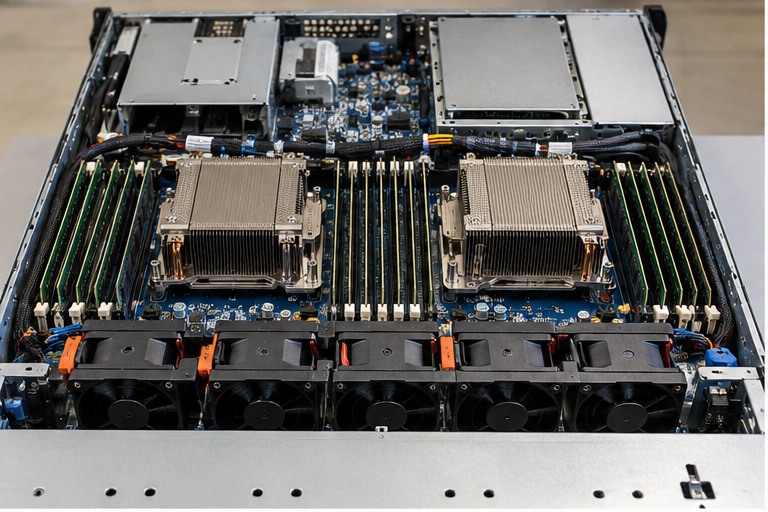
Use the exact server model, generation and manufacturer documentation before ordering or replacing a component. Similar appearance, wattage, connector or form factor does not prove compatibility.
1. Cooling is a system, not just a fan
Server cooling depends on chassis airflow, fan modules, heatsinks, air baffles, component placement and the room/rack environment. Removing a baffle, using an unsupported heatsink or obstructing an intake can affect the entire airflow path.
2. Front-to-rear airflow
Most rack servers are designed around a defined airflow direction through the chassis. Keep front intakes and rear exhaust paths clear. Do not assume every appliance follows the same airflow direction: check the equipment documentation.
3. Fans and redundancy
Enterprise platforms can use multiple monitored fan modules and may support fan redundancy in particular configurations. Required fan count can change when additional CPUs, GPUs, storage or other high-power options are installed.
4. Heatsinks must match the platform and CPU
CPU socket compatibility alone does not make a heatsink correct. The server may specify different heatsinks for processor power ranges or configurations. Use the supported thermal kit for the installed processor.
5. Air baffles and blanks matter
Internal baffles guide airflow through the components that require cooling. External rack blanking panels address a different problem: they help control airflow through unused rack spaces. Do not discard either as cosmetic plastic or sheet metal.
6. Thermal troubleshooting
- Read the management-controller thermal and fan events.
- Check failed or missing fan modules.
- Check air baffles and covers are installed.
- Check rack intake and exhaust obstruction.
- Check room inlet conditions.
- Check firmware and supported fan/heatsink configuration.
- Inspect dust accumulation according to the service procedure.
HARDWARE FOR THIS TOPIC